

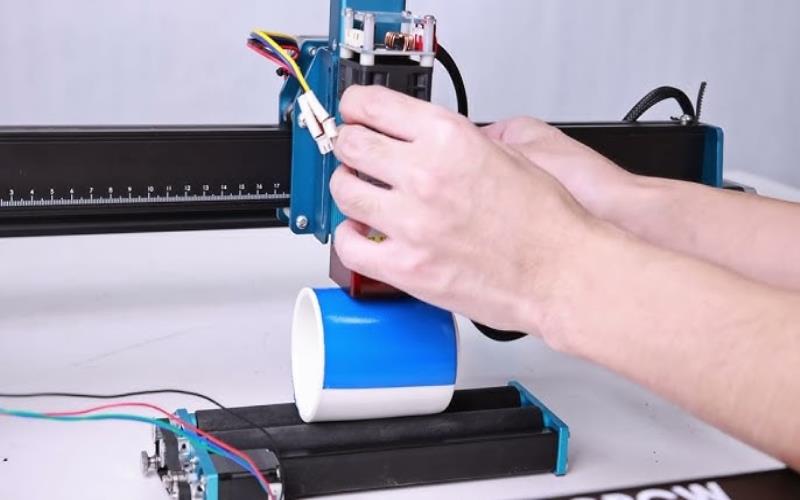
Laser etching on cylindrical objects can be tricky, but a rotary attachment makes it seamless by rotating the object for even, distortion-free engraving. Whether it’s metal tumblers, glassware, or industrial parts, this tool ensures precision and consistency.
Mastering its use means understanding the setup, adjusting laser settings, and aligning designs correctly. With the right techniques, you can create sharp, professional engravings for everything from branding to personalization.
What is Rotary Attachment for Laser Etching?
A rotary attachment is a specialized tool designed for laser metal etching machines, allowing them to etch designs onto cylindrical objects such as tumblers, glassware, and pipes.
Unlike flatbed laser etching, which works on two-dimensional surfaces, the rotary attachment enables smooth and precise engraving on rounded or irregular surfaces by rotating the object during the laser process.
Types of Rotary Attachments
Rotary attachments are essential for laser engraving and marking cylindrical objects. They come in different configurations, each designed for specific applications, materials, and precision requirements.
Roller-Type Rotary
This attachment uses rubberized wheels to roll the object while the laser moves linearly. It is ideal for engraving lightweight cylindrical items such as bottles, glasses, and tumblers. The rolling mechanism ensures smooth rotation but may require additional adjustments for objects with uneven weight distribution.
Chuck-Type Rotary
The chuck-type rotary attachment holds objects securely in place using a clamping mechanism, providing high precision and stability. It is best suited for heavy or rigid materials like metal pipes, tools, and industrial components. This type ensures minimal movement, making it ideal for detailed and high-accuracy engraving.
Adjustable Roller Rotary
Designed for flexibility, this attachment allows users to adjust roller positions to accommodate objects of different diameters. It is useful for businesses engraving a variety of cylindrical products, ensuring a secure fit and consistent rotation without requiring multiple attachments.
Setting Up the Rotary Attachment on Your Laser Machine
Proper setup of a rotary attachment is essential for achieving precise and consistent engraving results. Follow these steps to ensure correct installation and optimal performance.
Step 1: Preparing the Machine
- Turn off the laser machine and unplug it to prevent accidental operation during setup.
- If necessary, remove the standard flatbed engraving table to make room for the rotary attachment.
- Position the rotary attachment inside the engraving area, ensuring it is securely placed and aligned with the laser’s focal point for accurate engraving.
Step 2: Connecting the Rotary Attachment
- Plug the rotary attachment into the designated rotary port on the laser machine.
- Enable the rotary mode in the machine’s software interface to activate rotary engraving functionality.
- Configure the machine settings to recognize the attachment, adjusting speed, rotation direction, and other necessary parameters based on the material and design requirements.
Step 3: Positioning the Object
- Secure the cylindrical object using the chuck or roller system, ensuring a firm grip to prevent movement.
- Adjust the rollers or clamps to align the object’s center precisely with the laser beam for even engraving.
- Check for proper weight distribution to prevent slippage or misalignment during the etching process, ensuring a clean and accurate design.
Adjusting Laser Settings for Cylindrical Etching
When using a rotary attachment, laser settings must be optimized to accommodate the cylindrical shape and ensure even engraving. Adjusting resolution, focus, speed, power, and rotation settings helps achieve the best results.
Setting the Correct Resolution
- Since cylindrical surfaces curve away from the laser beam, higher resolution (DPI) settings improve detail and engraving clarity. Recommended settings:
- Low-resolution images (e.g., logos, text): 300–500 DPI for clear but simple designs.
- Detailed designs (e.g., intricate patterns, photographs): 600–1200 DPI for sharper and more precise engraving.
Adjusting the Focus
- Set the focal point at the highest point of the curved surface to ensure even depth across the engraving area.
- If the laser has an autofocus feature, use it to adjust the focus automatically. Otherwise, manually set the focus to maintain consistent engraving depth.
Optimizing Speed and Power
- Different materials require specific speed and power settings to achieve the best results:
- Metal objects: Use higher power (50–100W) and slower speed for deep etching and long-lasting marks.
- Glass and acrylics: Lower power with moderate speed to prevent shattering, chipping, or excessive burning.
- Plastics and coated metals: Moderate power with a faster speed to avoid excessive heat buildup and ensure clean, precise markings.
Managing Rotary Speed
- Set the rotation speed to match the laser’s engraving speed to maintain uniform detail.
- Ensure smooth transitions between design elements by avoiding sudden speed changes, which can cause distortions or uneven etching.
Tips for Aligning Designs on Rounded Surfaces
Proper alignment is crucial for achieving seamless and professional engraving results on cylindrical objects. Misalignment can lead to distorted or uneven designs, making precision techniques essential. Here are some effective strategies to ensure accurate engraving placement.
Use a Center Axis Alignment Method
To maintain symmetry, measure the object’s diameter and circumference accurately before scaling the design. Aligning the central elements of the engraving with the rotational axis ensures balanced placement, preventing skewed or mispositioned markings.
This method is especially useful for cylindrical objects like bottles, glasses, and tubes where precise positioning is required.
Utilize Software Grid and Templates
Most laser engraving software includes cylindrical mapping tools that allow users to preview their designs before execution. Grid overlays help maintain even spacing and proper orientation, ensuring the engraving follows the curvature of the object. Using these digital aids reduces the chances of misalignment and allows for real-time adjustments before engraving begins.
Test on Scrap Material First
Before working on the final product, running a test engraving on a similar material is a crucial step. This helps verify alignment, speed, and power settings while identifying any distortions that may occur due to rotation errors.
Consider Overlapping Edges for Continuous Designs
For wrap-around engravings, planning for seamless transitions at the start and end points is necessary. Overlapping edges slightly can help avoid gaps or misaligned sections. Many laser design software tools allow users to align these points precisely, ensuring that patterns and text appear continuous across the surface.
Applications of Laser Etching on Cylindrical Items
Laser etching with a rotary attachment is widely used across industries due to its precision, versatility, and ability to create permanent, high-quality engravings on curved surfaces. Here are some common laser etching products:
Custom Drinkware and Bottles
Laser engraving is frequently used for branding and personalization on stainless steel tumblers, glass bottles, and ceramic mugs. Businesses use it to etch company logos, promotional messages, and unique designs onto drinkware for marketing purposes.
Industrial Component Marking
In industrial settings, laser etching provides permanent identification on cylindrical parts such as metal pipes, tools, and machine components. Serial numbers, barcodes, and QR codes are etched onto materials like stainless steel and aluminum to improve traceability and compliance in industries such as aerospace and automotive manufacturing.
Engraving on Jewelry and Accessories
Jewelry manufacturers and designers use laser etching to create intricate patterns, monograms, and custom engravings on rings, bracelets, and cylindrical beads. This technology also enables precision marking on watch casings, cufflinks, and luxury accessories, allowing for personalized engravings that add sentimental and commercial value.
Artistic and Decorative Applications
Artists and craftsmen use laser etching to create intricate patterns and detailed engravings on cylindrical sculptures and decorative objects. Musical instrument makers also apply laser engraving to enhance the design of flutes, drum shells, and other cylindrical instruments, adding artistic flair without compromising the material’s integrity.
Conclusion
Using a rotary attachment for laser etching allows businesses to achieve precise, high-quality engravings on cylindrical objects. Proper setup, accurate laser settings, and alignment techniques ensure sharp, durable results. Whether marking industrial parts or personalizing drinkware, mastering these methods enhances efficiency and expands engraving possibilities across various industries.
